


UPDATE: Although this tutorial targets top 10 most important and frequently asked HTML5 interview questions, but I have prepared an additional series of MUST HAVE Interview Questions on HTML5 as:
Also, I have added Recent HTML5 Web/Mobile Developers Jobs at the end of this article that will definitely help you finding your dream job.
- What’s new HTML 5 DocType and Charset?
- How can we embed Audio in HTML 5?
- How can we embed Video in HTML 5?
- What are the new media element in HTML 5 other than audio and video?
- What is the usage of canvas Element in HTML 5?
- What are the different types of storage in HTML 5?
- What are the new Form Elements introduced in HTML 5?
- What are the deprecated Elements in HTML5 from HTML4?
- What are the new APIs provided by HTML 5 standard?
- What is the difference between HTML 5 Application Cache and regular HTML Browser Cache?
More HTML5 Interview Questions and Answers
- What is Web Forms 2.0 in HTML5?
- Briefly explain cache manifest file with an example?
- Is it possible to get the geographical location of a user using HTML5?
- What are HTML5 Semantic Elements? Explain with Example.
- How to use HTML5 details and summary elements?
- Article Vs Section tags in HTML5?
- What is an HTML5 Web Worker?
- What are the limitations of HTML5 Web Worker?
- Canvas Vs SVG?
- What are the new attributes introduced in HTML5 for <form> and <input> elements?
- What is a placeholder attribute in HTML5?
- What is a draggable attribute in HTML5?
1.What’s new HTML 5 DocType and Charset?
Normally for HTML files first line of code is DocType which basically tells browser about specific version of HTML. HTML5 is now not subset of SGML. As compared to previous version/standards of HTML, DocType is simplified as follows:
<!doctype html>
And HTML 5 uses UTF-8 encoding as follows:
<meta charset=”UTF-8″>
You can see a very simple HTML5 page below:

2.How can we embed Audio in HTML5?
HTML 5 comes with a standard way of embedding audio files as previously we don’t have any such support on a web page. Supported audio formats are as follows:
- MP3
- Wav
- Ogg.
Below is the most simple way to embed an audio file on a web page.
<source src=”jamshed.mp3″ type=”audio/mpeg”>
Your browser does’nt support audio embedding feature.
</audio>
 In above code, src value can be relative as well as absolute URL. We can also use multiple <source> elements pointing to different audio files. There are more new attributes for <audio> tag other than src as below:
- controls - it adds controls such as volume, play and pause.
- autoplay - it’s a boolean value which specifies that audio will start playing once it’s ready.
- loop - it’s also a boolean value which specifies looping (means it automatically start playing after it ends).
- preload - auto, metadata and none are the possible values for this attribute.
- auto means plays as it loaded.
- metadata displays audio file’s associated data
- none means not pre-loaded.
3.How can we embed Video in HTML 5?
Same like audio, HTML 5 defined standard way of embedding video files which was not supported in previous versions/standards. Supported video formats are as follows:
- MP4
- WebM
- Ogg
Please look into below sample code.
<source src=”Racing.mp4″ type=”video/mp4″>
Your browser does’nt support video embedding feature.
</video>
 Same like <audio>, <video> tag has associated optional attributes as controls, autoplay, preload, loop, poster, width, height and other global attributes etc. Controls, loop, preload and autoplay are already explained above. Others are explained below:
- poster - it’s basically a URL of the image that needs to display until video get started.
- width - video player width
- height - video player’s height
4.What are the new media element in HTML 5 other than audio and video?
HTML 5 has strong support for media. Other than audio and video tags, it comes with the following tags:
<embed> Tag: <embed> acts as a container for external application or some interactive content such as a plug-in. Special about <embed> is that it doesn’t have a closing tag as we can see below:
<source> Tag: <source> is helpful for multiple media sources for audio and video.
<source src=”jamshed.mp4″ type=”video/mp4″>
<source src=”jamshed.ogg” type=”video/ogg”>
</video>
<source src=”jamshed.mp4″ type=”video/mp4″>
<source src=”jamshed.ogg” type=”video/ogg”>
<track kind=”subtitles” label=”English” src=”jamshed_en.vtt” srclang=”en” default></track>
<track kind=”subtitles” label=”Arabic” src=”jamshed_ar.vtt” srclang=”ar”></track>
</video>
5.What is the usage of canvas Element in HTML 5?
<canvas> is an element in HTML5 which we can use to draw graphics with the help of scripting (which is most probably JavaScript).
This element behaves like a container for graphics and rest of things will be done by scripting. We can draw images, graphs and a bit of animations etc using <canvas> element.
<canvas id=”canvas1″ width=”300″ height=”100″>
</canvas>

As canvas is considered to be the most exciting feature in HTML5, following resources can be helpful to ehnance one’s skill in this area. I have listed few good websites on HTML5 canvas as well as available tools and libraries:
- Canvas From Scratch
Starting from scratch and follow the step by step approach to take to advance level.- Introduction to Canvas in HTML5
- Understanding advanced Drawing Topics
- Tranformation, Shadows and Gradients in HTML5 Canvas
- and finally Pixel Manipulation in Canvas
- Mozilla Developer Network - MDN
MDN acts a complete reference guide for HTML5 with detailed examples and code snippets. - HTML5 Canvas Tutorial
Canvas Tutorial is a good tutorial site for learning basics of HTML5 canvas topics including Lines, Curves, Paths, Shapes, Filling Styles, Images, Text Manipulation, Tranformation, Composites and Animation etc. - PlayCanvas
PlayCanvas is basically a WebGL Game Engine with a set of developer tools that can be used to develop 3D games for browser as well as mobiles.
For a more detailed reference to HTML5 Canvas resource, you can go to Emily Heming’s tutorial on this blog
“Top 20 Resources You Need To Master HTML5 Canvas“.
6.What are the different types of storage in HTML 5?
HTML 5 has the capability to store data locally. Previously it was done with the help of cookies.
Exciting thing about this storage is that its fast as well as secure.
There are two different objects which can be used to store data.
- localStorage object stores data for a longer period of time even if the browser is closed.
- sessionStorage object stores data for a specific session.
sessionStorage |
localStorage |
| It persists data until we close the window or tab in which it was stored. | It persist data even if the window or tab is closed (but can be explicitly removed or expires). |
| Values stored in sessionStorage are not shared. These will be visible only to respective window or tab. | Values stored in localStorage are shared for all windows and tabs from same origin. |
| Maximum size is 5MB. | Maximum size for localStorage is more between 10-15MB. |
 Working with localStorage is quite simple and having following methods:
- localStorage.getItem(key) -> fetch an item from storage against provided key.
- localStorage.setItem(key, value) -> add an item to storage.
- localStorage.removeItem(key) -> removes an item from storage against provided key.
- localStorage.clear() -> clearing the storage removing all items from it.
7.What are the new Form Elements introduced in HTML 5?
There are a number of new form elements has been introduced in HTML 5 as follows:
- datalist provides functionality for auto-complete feature.
- datetime facilitate selecting a datetime along with Time Zone.
- output represents the result of a calculation.
- keygen generates a key-pair field in a form to implement secure authentication.
- date is an input field for date and applies validation accordingly.
- month for selecting a month and year in a form input field.
- week for selecting a week and year in an input field.
- time is an input field for selecting time i.e. Hours:Minutes: AM/PM. For example, 10:30 AM.
- color is an input field for color.
- number that only allows numeric values.
- range is an input field for selecting value within a specified range.
- email is input field for email with standard email validations.
- url is for an URL(Uniform Resource Locator) and validated accordingly.
8.What are the deprecated Elements in HTML5 from HTML4?
Elements that are deprecated from HTML 4 to HTML 5 are:
- frame
- frameset
- noframe
- applet
- big
- center
- basefront
9.What are the new APIs provided by HTML 5 standard?
HTML 5 standard comes with a number of new APIs. Few of it are as follows:
- Media API
- Text Track API
- Application Cache API
- User Interaction
- Data Transfer API
- Command API
- Constraint Validation API
- History API
- and many more….
10.What is the difference between HTML 5 Application Cache and regular HTML Browser Cache?
One of the key feature of HTML 5 is “Application Cache” that enables us to make an offline version of a web application. It allows to fetch few or all of website contents such as HTML files, CSS, images, javascript etc locally. This feature speeds up the site performance. This is achieved with the help of a manifest file defined as follows:
|
1 2 3 4 |
<!doctype html> <html manifest="example.appcache"> ..... </html> |
As compared with traditional browser caching, Its not compulsory for the user to visit website
contents to be cached.
In order to achieve Application Cache feature in HTML5, a manifest file is used as follows:
|
1 2 3 4 |
<!doctype html> <html manifest=”test.appcache”> ….. </html> |
Manifest file is basically a text file that dictates what needs to be cache or not if Application Cache is enabled. Followings are the four main sections of a manifest file where CACHE MANIFEST is the only required section:
- CACHE MANIFEST
- CACHE
- NETWORK
- FALLBACK


More Advanced HTML5 Interview Questions and Answers
What is Web Forms 2.0 in HTML5?
Forms Section in HTML5 is known as Web Forms 2.0. It’s basically an extension to HTML4 forms features. Web Forms 2.0 in HTML5 provides comparatively a greater degree of semantic markups than HTML4 as well as removing the need of lengthy and tedious scripting and styling, as a result making HTML5 more richer but simpler in use.
Back to top
Briefly explain cache manifest file in HTML5 with an example?
Cache manifest file is simply a text file that dictates the browser, what to store for offline access? It basically list down the required resources for offline access.
CACHE MANIFEST
/decorate.css
/work.js
/amazing.jpg
So, the resources mentioned in above manifest file (decorate.css, work.js, and amazing.jpg) will be downloaded and cached locally for offline access.
Note: Remember to add manifest attribute for each page of our website we want to be cached.
Is it possible to get the geographical location of a user using HTML5?
Yes. It’s quiet possible to get the geographical location of a user using HTML5. As it has user’s privacy concerns so user’s approval needed. As we discussed above about new HTML5 API including Media API, Text Track API, Application Cache, User Interaction, Data Transfer API, Command API etc: HTML5 introduced new Geolocation API for locating a user’s position.
In order to get user position, getCurrentPosition() method is used as:
navigator.geolocation.getCurrentPosition(show_map);
Above code simply provides an idea how we can retrieve geographical location of a user. But while providing professional implementation, we will get user approval and also handle errors accordingly.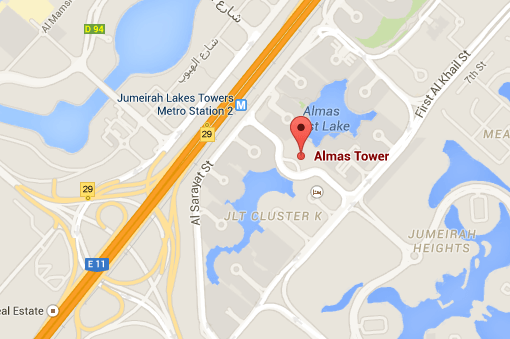
- Google Maps JavaScript API for beginners by Girish Shakya having 46 lectures, 2 hours videos, beginner level.
Using HTML5 and JavaScript, you will be:
- able to setup Google Maps APIs
- able to create Google Maps for devices
- able to create Google Maps in a website
- able to control the Maps UI events
For detailed course outline, follow here.
What are HTML5 Semantic Elements? Explain with Example.
Semantic elements are those elements that clearly explains the purpose or meaning of the element to user (developer). For example, <div> and <span> elements in HTML doesn’t explain what they will contain as contents. On the other hand, <img> and <form> elements clearly explains the contents it can contain.
HTML5 introduces many new semantic elements with few are demonstrated in below diagram: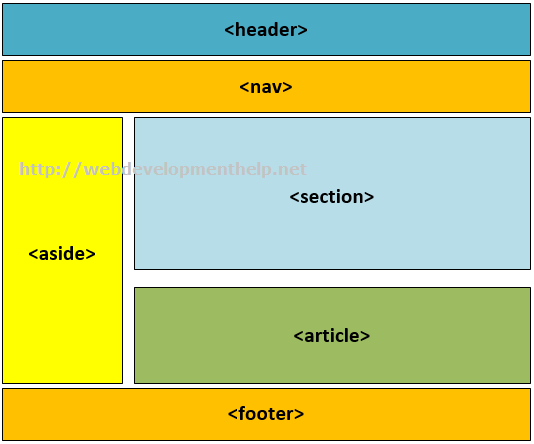
<header>, <nav>, <aside>, <section>, <article> and <footer> elements clearly explains the meaning of each element.
There are more semantic elements as listed below:
- <details>
- <figure>
- <figcaption>
- <main>
- <mark>
- <nav>
- <summary>
- <time>
How to use HTML5 details and summary elements?
HTML5 details and summary element can be used collectively to produce the below collapse/Expanse affect as follows:
Following is the source code of HTML5 details and summary element to produce above output.
Article Vs Section tags in HTML5?
An <article> tag is a complete and independent piece of content of a document or page. For Example, this article about HTML5 interview Question is a complete and independent piece of content on this page that covers a specific topic.
On the other hand, <section> tag refers to specific section of a document or page for grouping purpose. For Example, at the end of this page, we have a specific section for related list of “Top Interview Questions And Answers Series”. Or in right nav, we have a section for “Top Posts and Pages” of this website.
An <article> can wrap a <section> to represents a sub-topic as follows:
<article>
<h1>Interview Questions Series</h1>
<p>List of Web Development Interview Question with detailed answers for web developers.</p>
<section>
<h1>HTML5 Interview Questions</h1>
<p>List of Interview Questions on HTML5</p>
</section>
<section>
<h1>JavaScript Interview Questions</p>
<p>List of Interview Questions on JavaScript</p>
</section>
<section>
<h1>ASP.NET MVC Interview Questions</p>
<p>List of Interview Questions on ASP.NET MVC</p>
</section>
</article>
Back to top
What is an HTML5 Web Worker?
Normally if some script is executing in an HTML page, the page remains unresponsive until the scripts execution stops. But an HTML5 web worker is a script (i.e. JavaScript) that keeps executing in background. At the same time user can interact with the page and will not feel any performance degradation.
HTML5 web worker normally exists in external files and used for long-running CPU intensive tasks but without affecting the User Interface or other scripts.
Back to top
What are the limitations of HTML5 Web Worker?
HTML5 Web worker seems to be very handy in many scenarios (especially for CPU intensive tasks) but it has certain limitations. Few JavaScript objects are not accessible to HTML5 web worker as:
- parent object
- window object
- document object
<input id=”txtValue”/>
You need to change the HTML markup so that customers can enter only a valid three-letter country
code. Which HTML should you use?
- A. <input id=”txtValue” type=”country”/>
- B. <input id=”txtValue” type=”text” required=”xxx”/>
- C. <input id=”txtValue” type=”text” pattern-” [A-Za-z] {3} “/>
- D. <input id=”txtValuen type=”code” pattern”=”country”/>
For a complete HTML5 online test and Practice Exams, Click Here.
Correct Answer: C
Canvas Vs SVG?
Following table clearly explains the difference between Canvas and SVG (Scalable Vector Graphics):
Canvas |
SVG |
| Only ONE HTML Element for rendering graphics i.e. canvas element | Multiple Graphics Elements including (Circle, Rect, Boxes, Path, Line, Polygon etc.) |
| Draws Graphics on the fly using only Script i.e. JavaScript. | Support Script as well as CSS. |
| Primarily based on Pixels. | Based on Graphics elements as discussed above. |
| No manipulation using Event Handling due to pixel based interaction. | Can manipulate by attaching event handlers to SVG elements. |
| Better in Performance. | Slow in rendering when manipulating complex scenarios |
What are the new attributes introduced in HTML5 for <form> and <input> elements?
HTML5 being more richer having number of new attributes for <form> and <input> elements:
New attributes for <form> element are:
- autocomplete - to set autocomplete “on” or “off”.
- novalidate - not to be validated upon submit.

New attributes for <input> element are:
- form
- formaction
- formenctype
- formmethod
- formnovalidate
- formtarget
- placeholder
- step
- required
- pattern
- autofocus
- list
- multiple
- height and width
- min and max
What is a placeholder attribute in HTML5?
New placeholder attribute in HTML5 acts as a hint for input field value. It provides a kind of facilitating text for a description or expected type of value or an expected format of the value. For example, “Student Name” hints for a textbox expecting student name or “000-0000000″ hints for an expected phone number format etc.
|
1 |
<input type=”text” name=”studentName” placeholder=”Student Name” > |

placeholder attribute is applicable to following input types:
- text
- password
- url
- search
- tel
What is a draggable attribute in HTML5?
In order to make an element draggable, HTML5 introduces draggable attribute. By default, Links and Images are draggable. If we want to make a paragraph or a span element draggable, will set the draggable attribute of that specific element to true as:
|
1 |
<span draggable=”true”> |
Back to top
Need more HTML5 Interview Questions? please follow a MUST HAVE Interview Questions series for HTML5 here.
HTML5 Web/Mobile Developer Jobs [Updated Daily]
|
Java Programmer
|
Bedminster, NJ | 22-June-2017 |
|
Angular.js Developer (Atlanta)
|
Atlanta, GA | 15-June-2017 |
|
Jr. Software Engineer
|
Waltham, MA | 02-June-2017 |
|
Senior Front End Developer
|
Hollywood, FL 33024 | 14-June-2017 |
|
APPLICATION SUPPORT ANALYST II
|
Marietta, GA 30090 | 20-June-2017 |
|
Sr Java Developer (Front End)
|
Rockville, MD 20850 | 24-June-2017 |
|
Senior Software Engineer
|
Milwaukee, WI 53201 | 20-June-2017 |
|
Visual Designer
|
Remote | 01-July-2017 |
|
Website Designer/Developer
|
Lutz, FL 33559 | 15-June-2017 |
|
Junior Web Application Developer
|
St. Louis, MO 63103 | 28-June-2017 |
|
Sr. Display Front End Software Engineer
|
Redmond, WA 98052 | 20-June-2017 |
|
web developer
|
Redmond, WA | 30-June-2017 |
|
Node.js Programmer
|
San Diego, CA | 28-June-2017 |
|
Web Development Consultant
|
San Diego, CA | 16-June-2017 |
|
Angular2 Front-End Chief Architect
|
Remote | 29-March-2017 |
|
Visual Designer
|
Raleigh, NC | 22-June-2017 |
|
Front-end Developer
|
Tampa, FL 33619 | 22-May-2017 |
|
Entry Level Part-Time Web Designer
|
Troy, NY | 03-June-2017 |
|
Web Developer
|
Seattle, WA | 28-June-2017 |
|
Senior PHP Developer
|
Orlando, FL | 07-June-2017 |
|
Front-End Developer/Designer (Digital)
|
Owings Mills, MD | 02-July-2017 |
|
Developer - Full Stack
|
Washington, DC | 20-June-2017 |
|
Red Team Penetration Tester (Entry Level)
|
Orlando, FL 32825 | 22-June-2017 |
|
Mid / Sr. Golang Software Developer
|
Lehi, UT | 01-April-2017 |
|
Junior UX Developer/Designer
|
McLean, VA | 21-June-2017 |
Other Related Articles:

Top Web Developer Interview Questions and Answers Series:
- Top 10 WCF Interview Questions
- Comprehensive Series of WCF Interview Questions
- Top 10 HTML5 Interview Questions
- Top 10 ASP.NET Interview Questions
- Comprehensive Series of ASP.NET Interview Questions
- Top 10 ASP.NET MVC Interview Questions
- Top 10 ASP.NET Web API Interview Questions
- Top 10 ASP.NET AJAX Interview Questions