


How to create a simple Windows Communication Foundation (WCF) Service for Azure Service Fabric. Creating a client to call it, and a demonstration of the upgrading the service in real-time.
Azure Service Fabric is either a stateless or state full compute service that manages the execution, lifetime, and complexity part and code components. We can design micro service based architecture by using Service Fabric.
In Part-1 of this Microsoft Azure Tutorial Series for beginners, we covered all basic concepts related to cloud computing, Microsoft Azure as cloud computing platform, Comparing with other Cloud platforms and details about Microsoft Azure Services. Also, a step by step example to create a Virtual Machine on Microsoft Azure.
Here, we can explain how we create a simple “Windows Communication Foundation (WCF)” service using Service Fabrics “Stateless Service” and publish it to “Service Fabrics” local cluster. We are creating the project solution in Visual Studio 2015.
You can install service fabrics in your system by using Web Platform Installer 5.0 as bellows.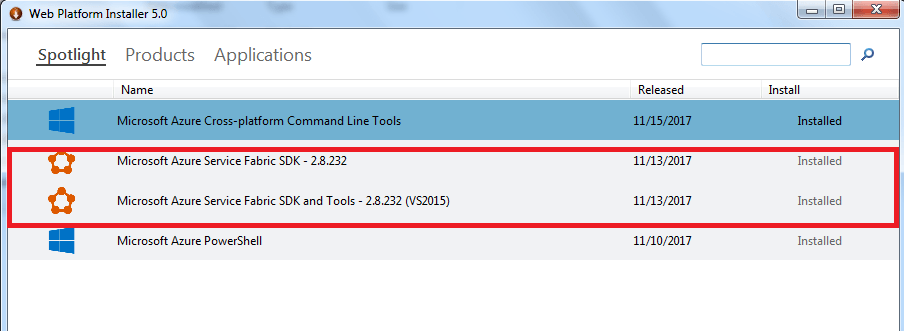
After successfully installation of Microsoft Azure Service Fabrics component follow below steps.
- Open the “Visual Studio 2015”.
- Create new project as below:

- Click “OK” button. Next window display as below.

- Select “Stateless Service”.
- See the whole application solution and architecture as below.
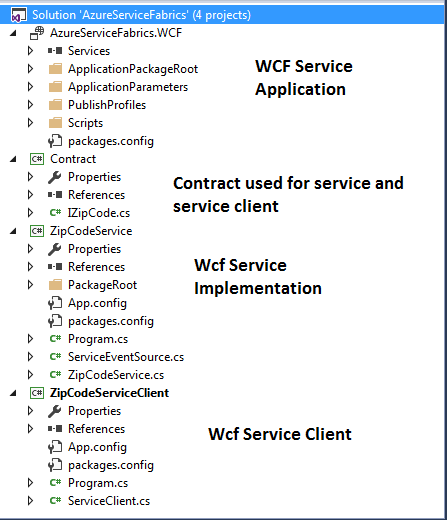
Here, we can create a zip code service; we create two service functions for that.
- Get City based on the zip code.
- Get the list of all the Cities.
Taught by:
- Roy H. Campbell, Professor of Computer Science.
- Reza Farivar, Data Engineering Manager at Capital One, Adjunct Research Assistant Professor of Computer Science.
Cloud Computing Application Online Course covers multitude of technologies comprising latest concepts of Cloud Computing.
- Cloud Computing Applications, Part 1: Cloud Systems and Infrastructure
- Introduction to Cloud Computing.
- Foundations - Containers, Virtual Machiens, JVM.
- MAAS, PAAS, Web Services
- Storage - Ceph, SWIFT, HDFS, NAAS, SAN, Zookeeper.
- Cloud Computing Applications, Part 2: Big Data and Applications in the Cloud
- Spark, Hortonworks, HDFS, CAP
- Large Scale Data Storage
- Streaming Systems
- Graph Processing and Machine Learning
Let’s Dive into Source Code for Microsoft Azure Tutorial:
We have created one new project called “Contract”, it is referenced in “ZipCodeService” as well as “ServiceClient” project. Now we have mentioned the project wise code as below.
Contract Project:
|
1 2 3 4 5 6 7 8 9 10 11 12 13 14 15 16 17 18 19 20 |
//IZipCode.cs using System; using System.Collections.Generic; using System.Linq; using System.ServiceModel; using System.Text; using System.Threading.Tasks; namespace Contract { [ServiceContract] public interface IZipCode { [OperationContract] Task<string> GetCityName(int zipCode); [OperationContract] Task<string> GetAllCities(); } } |
For this project you need to installed the nugget package
<package id=”Microsoft.ServiceFabric.Services.Wcf” version=”2.8.232″ targetFramework=”net452″ />
Also reference the “Contract” project.
|
1 2 3 4 5 6 7 8 9 10 11 12 13 14 15 16 17 18 19 20 21 22 23 24 25 26 27 28 29 30 31 32 33 34 35 36 37 38 39 40 41 42 43 44 45 46 47 48 49 50 51 52 53 54 55 56 57 58 59 60 61 62 63 64 65 66 67 68 69 70 71 72 73 74 75 76 77 78 79 80 81 82 83 84 85 86 87 88 89 90 91 92 93 94 95 96 97 98 99 100 101 102 103 104 105 106 107 108 109 110 111 112 |
//ZipCodeService.cs using System; using System.Collections.Generic; using System.Fabric; using System.Linq; using System.Threading; using System.Threading.Tasks; using Microsoft.ServiceFabric.Services.Communication.Runtime; using Microsoft.ServiceFabric.Services.Runtime; using System.ServiceModel; using Microsoft.ServiceFabric.Services.Communication.Wcf.Runtime; using Contract; namespace ZipCodeService { /// <summary> /// An instance of this class is created for each service instance by the Service Fabric runtime. /// </summary> internal sealed class ZipCodeService : StatelessService, IZipCode { List<ZipCodeAndCity> Cities; public ZipCodeService(StatelessServiceContext context) : base(context) { Cities = GetAllCityAndZipCode(); } public Task<string> GetAllCities() { return Task.FromResult<string>( string.Format("Major Cities Of US: {0}", string.Join(", ", Cities.Select(c=>c.CityName).ToList()) ) ); } public Task<string> GetCityName(int zipCode) { var cityName = "Sorry, No City Exists For Given ZipCode"; var city = Cities.Where(c => c.ZipCode == zipCode).FirstOrDefault(); if (city != null) { cityName = city.CityName; } return Task.FromResult<string>( string.Format("City: {0}", cityName) ); } /// <summary> /// Optional override to create listeners (e.g., TCP, HTTP) for this service replica to handle client or user requests. /// </summary> /// <returns>A collection of listeners.</returns> protected override IEnumerable<ServiceInstanceListener> CreateServiceInstanceListeners() { const int bufferSize = 512000; //500KB NetTcpBinding binding = new NetTcpBinding(SecurityMode.None) { SendTimeout = TimeSpan.FromSeconds(35), ReceiveTimeout = TimeSpan.FromSeconds(35), CloseTimeout = TimeSpan.FromSeconds(35), MaxConnections = 999, MaxReceivedMessageSize = bufferSize, MaxBufferSize = bufferSize, MaxBufferPoolSize = bufferSize * Environment.ProcessorCount, }; ServiceInstanceListener listener = new ServiceInstanceListener(context => new WcfCommunicationListener<IZipCode>(context, this, binding, "ServiceEndpoint") ); return new[] { listener }; } #region Private Methods private List<ZipCodeAndCity> GetAllCityAndZipCode() { var cities = new List<ZipCodeAndCity>(); cities.Add(new ZipCodeAndCity { CityName = "Huntsville", ZipCode = 35801 }); cities.Add(new ZipCodeAndCity { CityName = "Anchorage", ZipCode = 99501 }); cities.Add(new ZipCodeAndCity { CityName = "Phoenix", ZipCode = 85001 }); cities.Add(new ZipCodeAndCity { CityName = "Little Rock", ZipCode = 72201 }); cities.Add(new ZipCodeAndCity { CityName = "Sacramento", ZipCode = 94203 }); cities.Add(new ZipCodeAndCity { CityName = "Los Angeles", ZipCode = 90001 }); cities.Add(new ZipCodeAndCity { CityName = "Beverly Hills", ZipCode = 90209 }); cities.Add(new ZipCodeAndCity { CityName = "Denver", ZipCode = 80201 }); cities.Add(new ZipCodeAndCity { CityName = "Hartford", ZipCode = 06101 }); cities.Add(new ZipCodeAndCity { CityName = "Dover", ZipCode = 19901 }); cities.Add(new ZipCodeAndCity { CityName = "Washington", ZipCode = 20001 }); cities.Add(new ZipCodeAndCity { CityName = "Pensacola", ZipCode = 32501 }); cities.Add(new ZipCodeAndCity { CityName = "Miami", ZipCode = 33124 }); cities.Add(new ZipCodeAndCity { CityName = "Orlando", ZipCode = 32801 }); cities.Add(new ZipCodeAndCity { CityName = "Atlanta", ZipCode = 30301 }); return cities; } #endregion } public class ZipCodeAndCity { public int ZipCode { get; set; } public string CityName { get; set; } } } |
|
1 2 3 4 5 6 7 8 9 10 11 12 13 14 15 16 17 18 19 20 21 22 23 24 25 26 27 28 29 30 31 32 33 34 35 36 37 38 39 40 |
Program.cs using System; using System.Diagnostics; using System.Fabric; using System.Threading; using System.Threading.Tasks; using Microsoft.ServiceFabric.Services.Runtime; namespace ZipCodeService { internal static class Program { /// <summary> /// This is the entry point of the service host process. /// </summary> private static void Main() { try { // The ServiceManifest.XML file defines one or more service type names. // Registering a service maps a service type name to a .NET type. // When Service Fabric creates an instance of this service type, // an instance of the class is created in this host process. ServiceRuntime.RegisterServiceAsync("ZipCodeServiceType", context => new ZipCodeService(context)).GetAwaiter().GetResult(); ServiceEventSource.Current.ServiceTypeRegistered(Process.GetCurrentProcess().Id, typeof(ZipCodeService).Name); // Prevents this host process from terminating so services keep running. Thread.Sleep(Timeout.Infinite); } catch (Exception e) { ServiceEventSource.Current.ServiceHostInitializationFailed(e.ToString()); throw; } } } } |
Now, simple wcf service for service fabrics is ready. For publishing the wcf service, you need to build the solution and if the solution build successfully, right click the “AzureServiceFabrics.WCF” project and click on publish. The below screen display when you click on “Publish.
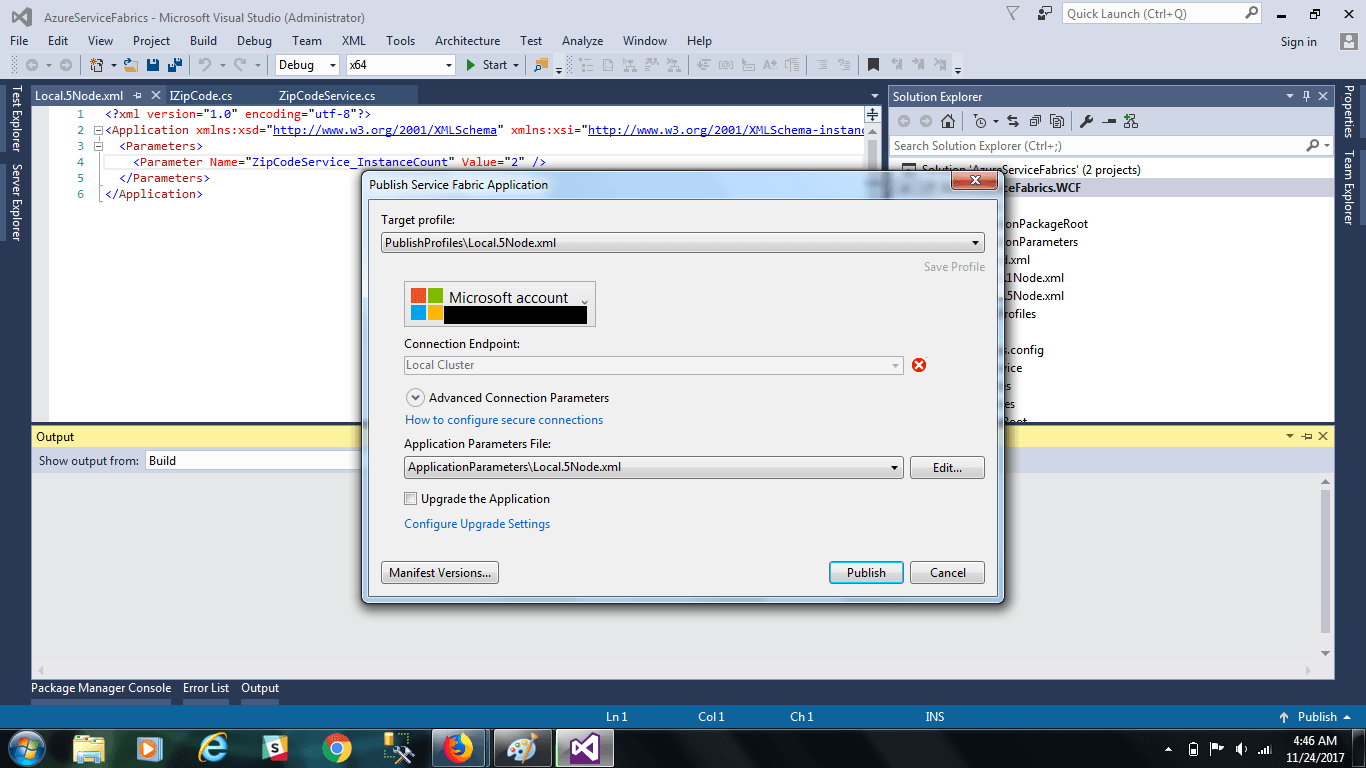
Click on “Publish” Button.
After publish successfully, double click on Service Fabrics icon from window system tray, as display below:
Above screen display the Service Fabrics Explorer, in which you can see your wcf services.

70-532 Developing Microsoft Azure Solutions Certification
The most complete course available on the Microsoft Azure updated developer exam and certification.

70-534 Architecting Microsoft Azure Solutions Certification
Get Azure certified as an architect in one of Microsoft’s newest certifications on the hottest cloud platform Azure.
View All Training and Certification Courses
ZipCodeServiceClient:
|
1 2 3 4 5 6 7 8 9 10 11 12 13 14 15 16 17 18 19 20 21 22 23 24 25 26 27 28 29 30 31 32 33 34 35 36 37 38 39 40 41 42 43 44 45 46 47 48 49 50 51 52 53 54 55 56 57 58 59 60 61 62 63 64 65 66 67 68 69 70 71 72 |
//ServiceClient.cs using Contract; using System; using System.Threading.Tasks; using Microsoft.ServiceFabric.Services.Communication.Wcf.Client; using Microsoft.ServiceFabric.Services.Communication.Client; namespace ZipCodeServiceClient { public class ServiceClient :ServicePartitionClient<WcfCommunicationClient<IZipCode>> { public ServiceClient(CommunicationClientFactoryBase<WcfCommunicationClient<IZipCode>> communicationClientFactory, Uri serviceUri) : base(communicationClientFactory, serviceUri) { } public Task<string> GetAllCities() { return this.InvokeWithRetryAsync(client => client.Channel.GetAllCities()); } public Task<string> GetCityName(int zipCode) { return this.InvokeWithRetryAsync(client => client.Channel.GetCityName(zipCode)); } } } Program.cs using Contract; using Microsoft.ServiceFabric.Services.Client; using Microsoft.ServiceFabric.Services.Communication.Wcf.Client; using System; using System.Fabric; using System.ServiceModel; namespace ZipCodeServiceClient { class Program { static void Main(string[] args) { ServicePartitionResolver servicePartitionResolver = new ServicePartitionResolver(() => new FabricClient()); const int bufferSize = 512000; //500KB NetTcpBinding binding = new NetTcpBinding(SecurityMode.None) { SendTimeout = TimeSpan.FromSeconds(35), ReceiveTimeout = TimeSpan.FromSeconds(35), CloseTimeout = TimeSpan.FromSeconds(35), MaxConnections = 999, MaxReceivedMessageSize = bufferSize, MaxBufferSize = bufferSize, MaxBufferPoolSize = bufferSize * Environment.ProcessorCount, }; WcfCommunicationClientFactory<IZipCode> communicationClientFactory = new WcfCommunicationClientFactory<IZipCode>(binding, servicePartitionResolver: servicePartitionResolver); Uri uri = new Uri("fabric:/AzureServiceFabrics.WCF/ZipCodeService"); ServiceClient zipCodeServiceClient = new ServiceClient(communicationClientFactory, uri); int zipCode = 85001; string city = zipCodeServiceClient.GetCityName(zipCode).Result; Console.WriteLine("{0} is the zipCode of {1} city", zipCode, city); string cities = zipCodeServiceClient.GetAllCities().Result; Console.WriteLine("The Major City Of US are {0}", cities); Console.ReadLine(); } } } |

For upgrading wcf service is very easy. When you have made a changes in your wcf service code, then publish it again by clicking “Upgrade The Application” check box during publish.
In this Microsoft Azure Tutorial, we explain the creating wcf service with service fabrics and create a client for consuming the wcf service. Here, we used stateless services. There are various other options for creating service fabrics application.
Take this Microsoft Azure Course at Discounted Price
- Cloud Computing with Apache CloudStack: Run your own cloud
- AWS Architect Certification Training
- Learn to Develop for Cloud with Pivotal Cloud Foundry
- Microsoft Azure Certification Training
- Introduction to Cloud Computing with Amazon Web Services
- View All Cloud Computing Training and Certification