


Today, we are going to cover another topic in Technical Interview Questions and Answers Series i.e. Backbone.js. Previously, we explored various JavaScript Libraries and Frameworks including jQuery, AnguarJS 1.x & AngularJS 2.0, ReactJS, NodeJS etc and you can follow to read more related here. We tried to cover the maximum areas in each Technology so that reader at each level (Beginner or Intermediate or Advanced one) can take advantage from it.
BackboneJS is another famous JavaScript Library, we will explore all various features by following Interview Question and Answer pattern as we did earlier.
Backbone.js Interview Questions PDF version will be available later for download.
Backbone.js Interview Questions List
- What is Backbonejs? What are the key advantages of using Backbone.js? Is there any downside using BackboneJS?
- How Backbone different from other JavaScript Frameworks like AngularJS, ReactJs etc.
- How to set up environment for BackboneJS? Explain by following a step by step approach.
- What are the main components of Backbone.js? Also, discuss in detail the architectural style of BackboneJS Application with the help of a diagram.
- What is Backbone JS Event? Explain event handling in backbone.js with an example.
- How to read files (JSON) in backbone.js?
- How to implement HTTP Requests, for example GET, POST, PUT and DELETE using Backbonejs? Explain With example?
- Explain History and its usage with example?
- How to use child views? Explain with example.
- What is Collection in Backbone.js? Explain with example.
- How to bind model to view?
- How to bind Model to event?
- How to render view? Explain with example.
- What is Template? How to use Template in Backbonejs?
- What is Router? Explain with Example.
- What is Utility? Explain with Example.
- What is Converter? Explain with Example.
- How to configure Jasmine to execute unit testing. Explain with example.
- How to Config MongoDb and setpup connection in Backbonejs Application?
- How to prevent Memory Leaks in Backbone.js?
What is Backbonejs? What are the key advantages of using Backbone.js? Is there any downside using BackboneJS?
What is Backbone.js?
Backbone.js is mainly a light weight JavaScript library rather than a framework which is used to structure code in a large scale application or a single page web application. The other features of backboneJS are as follows:
- It follows Model-View- Controller (MVC) architecture.
- It provides functionality to access database and manipulate data.
What are the key advantages of using BackboneJS?
- It provides minimal set of data structure only Model and Collection to develop applications ranges from embedded widget to large scale.
- Views and URL are user interface which are capable of binding to model and event.
- There is no performance drawback of using backboneJS in large scale application.
- It provides dynamic Model – View and Model - Event binding.
- The main feature of backbone.js is that it provides a way to manage and organize code.
Downside using Backbone.js?
It is not a complete framework, therefore in the era of ReactJS and AngularJS the usages of BackboneJS is very few and its getting to be obsolete day by day.
Back to top
How Backbone different from other JavaScript Frameworks like AngularJS, ReactJs etc.
Framework Engine:
Backbone.js does not provide framework engine, on the other hand, emberjs, angularjs and reactjs provide their own framework engine.
Template Engine:
Angular, Ember and React provides their template engine for development, however backbone allow user to choose independently.
However, backbone.js is light, easy to learn and easily adoptable.
BackboneJS Vs AngularJS Vs ReactJS Vs Ember?
According to the google trend, backbonejs gained some popularity around 2012. However, after 2014, backbone.js has lost its popularity to reactjs and angularjs.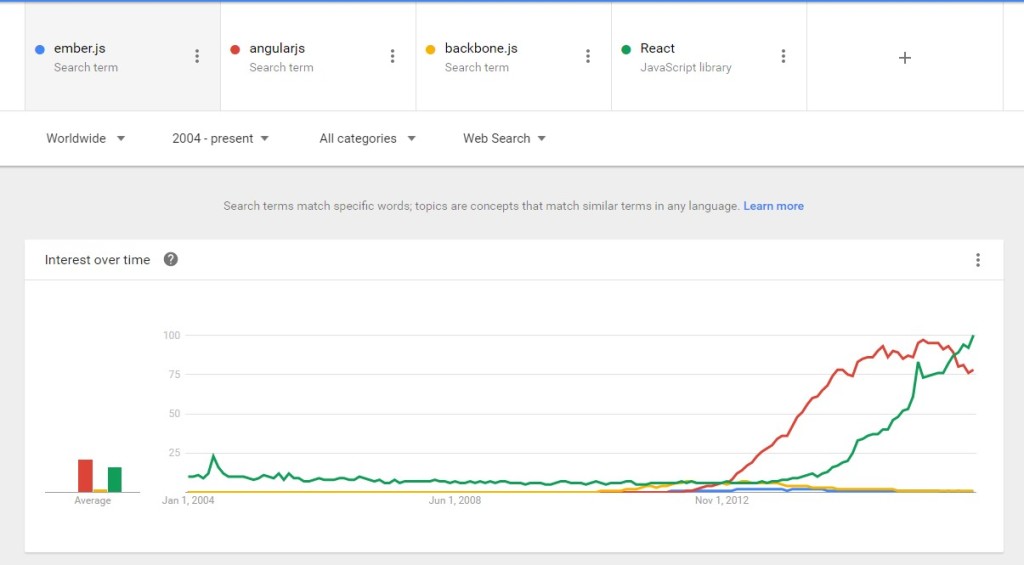
How to set up environment for BackboneJS? Explain by following a step by step approach.
- Create a new folder with the name same as project name.

- Create a file called index.html. This is the main html file for the app.
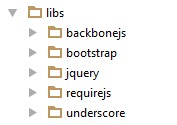
- Now organize folders for different components inside the folder called ‘components’. For each components there will be a folder for models, a folder for collections and a folder for views and html templates. For example, here is the folders and files for ‘book’ component.

- Create a folder for routers called ‘routers’.
- Create folder for assets.
- Finally, the folder structure for the project will look as following:

- On index.html.
123456789101112131415161718192021222324252627282930313233<!DOCTYPE HTML><html><head><title>Example Backbone App</title><!-- load the bootstrap stylesheet --><link href="libs/bootstrap/dist/css/bootstrap.css" media="all" rel="stylesheet" type="text/css" /></head><body><div class="container"><!-- The container for the app. --></div><!-- load the libraries we need --><script src="libs/jquery/dist/jquery.min.js"></script><script src="libs/underscore/underscore.js"></script><script src="libs/backbonejs/backbone.js"></script><script src="libs/backbonejs//backbone.localStorage-min.js"></script><!-- load our scripts --><script src="routers/book_router.js"></script><script src="components/book/models/book.js"></script><script src="components/book/collections/books.js"></script><script src="components/book/views/book_index.js"></script><script src="components/book/views/book_new.js"></script><script src="components/book/views/book_edit.js"></script><script src="helpers/helpers.js"></script><script>var app = new APP.BookRouter();</script></body></html>
What are the main components of Backbone.js? Discuss in detail the architectural style of BackboneJS Application with the help of a diagram.
What are the main components of Backbone.js?
The main components of backbone.js are as following:
- Events
- Backbone.Model
- Backbone.Collection
- Backbone.Router
- Backbone.Sync
- Backbone.View

Events:
Events are the core component of backbonejs. This is the basic way of controller. Events is accessible by an instance of Model, Collection, View, Router and History. Therefore, any instance of Model, Collection, View, Router and History can dispatch and listen to event to which they are bind to. The global ‘Backbone’ can also access events as following:
|
1 2 |
Backbone.on('event', function() {console.log('Handled Backbone event');}); Backbone.trigger('event'); // logs: Handled Backbone event |
The second parameter which is a function is registered as a handler to be called when a specific event by the name passed as the first parameter occurs. Similarly, for any instance of any model can access Event.
For example, if an object called Obj1 wants to notify another object whenever it gets changed, it can dispatch the notify event. Any object interest to listen to the change of Obj1 can bind to the ‘notify’ event and can listen to when Obj1 gets changed and can perform necessary action they require. Obj1 does not need to know who is listening to it’s notify event and what they are performing on it’s change.
There are some core events such on, off, listento and trigger.
Backbone.Model:
In a MVC framework like backbone.js, Model is the main fundamental concept. A model is a representation of any component use in application. Therefore, a model can be represented as following:
Each Model in Backbone js are created by extending Backbone.Model.
|
1 2 3 4 5 6 7 8 |
var Book = Backbone.Model.extend({ defaults: { type: "Science Fiction" }, initialize: function() { console.log("Book Model initialize" +JSON.stringify(this.attributes)); } }); |
Here default is used if we want to set any default attribute to every instance of the Model.
Now if we create an instance of Book Model as following:
|
1 2 3 4 5 6 7 8 9 10 11 |
var book1 = new Book({ "title": "The Winter Over", "yearPublished": 2010, "author": "Mathew Iden" }); var book2 = new Book({ "title": "Harry Potter and the Cursed Child", "yearPublished": 2016, "author": "J. K. Rawlings" }); |
Every time a new instance of a Model will be created, the initialized will be called. On the console, the output would be:
Backbone.Model provides getter and setter in order to access the Object directly. If we want to access the title attribute of Book Model for any of its instance we just need to access as book1.get(…). Similarly, Backbone.Model provides setter to change any of it’s attribute.
|
1 2 3 |
console.log(book1.get('title')); // Retrieved with model's get() method. console.log(book2.set({'yearPublished':2016})); // use model's set() method. |
The output of getter and setter would be as following:
It is possible to use on event to detect change in any of the instance for example,
|
1 2 3 4 5 6 7 8 9 10 11 12 13 |
var Book = Backbone.Model.extend({ defaults: { type: "Science-Fiction" }, initialize: function() { console.log("Book Model initialize"+JSON.stringify(this.attributes)); this.on('change', function(){ console.log('- Values for this model have changed.'); }); this.on("change:yearPublished", function() { console.log('yearPublished changed'); }); } }); |
The output would be:
Backbone also supports model validation through model.validate() . For example:
|
1 2 3 4 5 6 7 8 9 10 11 12 13 14 15 16 17 18 19 20 |
var Book = Backbone.Model.extend({ defaults: { type: "Science-Fiction" }, initialize: function() { console.log("Book Model initialize"+JSON.stringify(this.attributes)); this.on('change', function(){ console.log('- Values for this model have changed.'); }); this.on("change:yearPublished", function() { console.log('yearPublished changed'); }); }, validate: function (attrs) { var errors = {}; if (!attrs.title) errors.title = "Title is Required."; if (!attrs.description) errors.description = "Description is Required!"; if (!attrs.author) errors.author = "Author is Required"; if (!_.isEmpty(errors)) return errors; } }); |
Here , the validate method of the Book model defines the required attribute of Book object and define the corresponding error message. Now by using {validate: true} while creating an instance of the Model. For example:
|
1 2 3 4 5 |
var book1 = new Book({ "title": "The Winter Over", "yearPublished": 2010, "author": "Mathew Iden" },{validate: true}); |
Here is the output, as description attribute for the instance book1 has not been given.
Backbone.Collection:
The next component for backbone.js is collection. Collection is usually a list of instance of a particular Model which is created by extending Backbone.Collection. Every collection is bind to a Model. Here is an example of a collection of Objects of type Book Model.
|
1 2 3 4 5 6 |
var Books = Backbone.Collection.extend({ model: Book, initialize: function() { console.log("Book Collection has been initialized"); } }); |
Now if we create an instance of the collection as following:
|
1 2 3 |
var books = new Books([book1, book2]); console.log("Lenth of the Books collection: "+books.length); console.log("The title of the second element in the collection: "+books.at(1).get("title")); |
The output would be as following:
Backbone.Router:
Routers are created by extending Backbone.Router which gives the way to communicate between different action, events and view. This is just like a default navigation for Backbone.js application. Router are triggered or started by Backbone.History. Usually it is recommended to have a single router parent for an application. Router.navigate() is another function of Router class which is triggered in order to change the the route along with updating the URL by passing the trigger:true option.
Backbone.Router can also be bound to event as like Model, Collection and View. On triggering “route” event on the router, it is possible to control the navigation as following:
|
1 2 3 4 5 6 7 |
Backbone.history.on('route', onRoute); router.on('route', function(name, args) { console.log(name === 'routeEvent'); }); location.replace('http://example.com#route-event/x'); Backbone.history.checkUrl(); |
Backbone.Sync:
Every time there is a read, save, or delete models operation, Backbone.sync is called. It makes RESTful requests using jQuery. This can be overridden.
|
1 2 |
Backbone.sync = function(method, model, options) { }; |
Backbone.View?
Backbone View is used to represent any Model or collection on the DOM of HTML. Therefore, View is usually a HTML element which is added to the DOM of the Html Page. If there is any user action such as keyup, keydown, corresponding view of the element get notified. If there is any change in the model that is being represented by the View, the view get notified and can take necessary action defined. Backbone.View class is also kind of a controller, dispatch events and change the DOM element accordingly.
|
1 2 3 4 5 6 7 8 9 10 11 12 13 14 15 16 17 18 19 20 21 22 23 24 25 26 27 28 29 30 31 32 33 34 35 36 37 38 39 |
var BookNewView = Backbone.View.extend({ // functions to fire on events // here we are blocking the submission of the form, and handling it ourself events: { "click button.save": "save", "keyup input": "validate", "keyup textarea": "validate" }, template: _.template($('#formTemplate').html()), initialize: function (options) { // this.model.bind('invalid', ); }, save: function (event) { // save button action event.stopPropagation(); event.preventDefault(); // update our model with values from the form this.model.set({ title: this.$el.find('input[name=title]').val(), author: this.$el.find('input[name=author]').val(), description: this.$el.find('textarea[name=description]').val() }); if (this.model.isValid()) { // save it this.collection.add(this.model); this.model.save(); // add it to the collection // redirect back to the index Backbone.history.navigate("notes/index", {trigger: true}); } }, // populate the html to the dom render: function () { this.$el.html( this.template(this.model.toJSON()) ); return this; } }); |
What is Backbone JS Event? Explain event handling in backbone.js with an example.
BackboneJS Events can be bound to view, model and collection. Therefore, it is possible every time there is a change in any of these three main components of BackboneJs, corresponding event triggered.
|
1 2 3 4 5 6 7 8 9 10 11 12 13 14 15 16 17 18 19 20 21 22 |
<body> <div id="bookTitle"> Title: <input type="text" id="input-text" /> </div> <script type="text/javascript"> var InputField = Backbone.View.extend({ el: "#bookTitle", initialize: function () { }, events: { "keyup #input-text": "change" }, change: function (event) { console.log(event); console.log("input-text: " + $(event.target).val()); } }) var title = new InputField (); </script> </body> |
Therefore, every view can be connected to particular event. According to the above example, every time there is a key up event occur on the input html element with id ‘input-text’, the corresponding method ‘change’ will be triggered.
Similarly, event can be bounded to Collection, Model and View element as well.
How to Read files (JSON) in BackboneJS.
Backbone.Collection can be defined using JSON File. For example, if we have a JSON file called books.json with a number of instance of Model Book.
|
1 2 3 4 5 6 7 8 9 10 11 12 13 14 15 16 17 18 19 20 21 22 23 24 25 26 27 28 29 30 31 32 |
[ { "id": "978-0641723445", "yearPublished": 2010, "title": "The Lightning Thief", "author": "Rick Riordan", "series_t": "Percy Jackson and the Olympians", "type": "fantasy" }, { "id": "978-1423103349", "yearPublished": 2010, "title": "The Sea of Monsters", "author": "Rick Riordan", "series_t": "Percy Jackson and the Olympians", "type": "fantasy" }, { "id": "978-1857995879", "yearPublished": 2010, "title": "Sophie's World : The Greek Philosophers", "author": "Jostein Gaarder", "type": "fantasy" }, { "id": "978-1933988177", "yearPublished": 2010, "title": "Lucene in Action, Second Edition", "author": "Michael McCandless", "type": "IT" } ] |
And Now if we want to create Collection instance using the JSON file. We can use fetch method of Backbone.Collection.
|
1 2 3 4 5 |
var books = new Books(); books.fetch({ url: "components/book/collections/books.json", success: function() { console.log(books); }}); |
The output would be as following:
How to implement HTTP Requests, for example GET, POST, PUT and DELETE using Backbonejs? Explain With example?
BackboneJS does not provide own framework, therefore, it requires separate framework for making HTTP request. Therefore, it requires third party library for example Express.js and Node.js.
- Install NodeJS.
- Inside the project folder, create a package.json file.
1234567891011121314151617181920212223242526272829{"name": "samplebeapp","description": "","version": "0.0.1","scripts": {"start": "node server.js"},"dependencies": {"express": "latest"},"devDependencies": {"jasmine": "~1.3.1"},"exportsOverride": {"jquery": {"js": "jquery.js"},"underscore": {"js": "underscore.js"},"backbone": {"js": "backbone.js"},"backbone.marionette": {"js": "lib/backbone.marionette.js"},"jasmine": {}}} - Install libraries using ‘npm install command’.
- Create a server.js file.
1234567891011121314151617181920212223242526272829303132var express = require('express'),http = require('http'),path = require('path'),routes = require('./app/routes'),exphbs = require('express3-handlebars'),mongoose = require('mongoose'),seeder = require('./app/seeder'),app = express();app.use('/', express.static(path.join(__dirname, 'public')));// make a GET requestapp.get('/books',function(req,res){data = {"id": "978-0641723445","yearPublished": 2010,"title": "The Lightning Thief","author": "Rick Riordan","series_t": "Percy Jackson and the Olympians","type": "fantasy","description":"ä fantasy story"}res.writeHead(200,{'Content-Type':'application/json'});res.write(JSON.stringify(data));res.end();});// make a POST requestapp.post('/books',function(req,res){console.log('Post Request Accepted' );});http.createServer(app).listen(8124); - Run the script ‘node server’.
Explain History and its usage with example?
Backbone.History is used to keep track of the navigation history of different routes, it is also used to match the appropriate route, fires callbacks to handle events. Therefore, Backbone.History enables routing in application.
The first requirement of enabling routing in the application is to create a router extending Backbone.Router. The next step is to create an instance of the router, for example:
|
1 2 3 4 5 6 |
<script> //create an intance of Router var app = new BookRouter(); //Start listening to the routes and manages the history for bookmarkable URL's Backbone.history.start(); </script> |
- This start method of Backbone.History starts listening to routes and manages the history.
- It monitors the trigger of ‘hashchanged’ which is trigger every time the route is changed. This method can be called once.
- Any subsequent calls to Backbone.history.start() will throw an error, and it will return the Backbone.History.started variable which is a boolean value indicating the status of History monitoring either started or not.
- Backbone.history.start([options]), this can receive a parameter options. For modern browser, this options can be {pushState: true} and for old browser, that does not support pushState, this can be ‘{hashChange: false}’.
- Backbone.history.start() returns true. If no defined route matches the current URL, it returns false.
- It is recommended to call start() only after the DOM is ready.
Another method of Backbone.History is navigate. For example, once a model has been saved if we want to redirect the navigation to the index page, it could be done as following:
|
1 2 3 4 5 6 7 8 |
if (this.model.isValid()) { // save it this.collection.add(this.model); this.model.save(); // add it to the collection // redirect back to the index Backbone.history.navigate("books/index", {trigger: true}); } |
How to use child views? Explain with example.
- In index.html page create a container for the IndexView.
123<div class="container" id="indexTemplate"><!-- The container for the index View. --></div> - Create a new view called BookIndexView.
This View has a method called ‘addChildView’ which will be used to add child View in the parent View.1234567891011121314151617181920"use strict";var BookIndexView = Backbone.View.extend({el: "#indexTemplate",initialize: function () {console.log('Book Index View Initialized');},render: function () {var that = this;$.get('components/book/views/book_index.html', function (data) {var template = _.template(data, {});that.$el.html(template);}, 'html');},addChildView:function(model){var nestedView = new BookView({model: model});this.$el.append(nestedView.render());}}); - The html template for BookIndex view is as following:
1<H1> The List of Books</H1> - Now Lets create the child View for each Book. Where each book View would look like:

- The Html template for BookView book.html.
1234567891011121314151617181920212223<div class=" col-md-4"><div class="panel panel-success"><div class="panel-heading"><dt class="pa"> Title</dt><dd><%= title %></dd><div class="top-left list-inline"><button> Edit</button></div></div><div class="panel-body"><dt>Author</dt><dd><%= author %></dd><dt> </dt></div><div class="panel-footer"><dt>Published on</dt><dd><%= yearPublished %></dd></div></div></div> - The Javascript for BookView.
123456789101112131415161718192021222324252627282930var BookView = Backbone.View.extend({el: "#indexTemplate initialize: function () {console.log('Book View Initialized'+JSON.stringify(this.model));},render: function () {var that = this;$.get('components/book/views/book.html', function (data) {//template = _.template(data, that.model.toJSON());//Option to pass any dynamic values to template//that.$el.html(template);//adding the template content to the main template.var template = _.template(data);var html = template(that.model.toJSON());that.$el.append(html);}, 'html');},modelChanged: function (model, changes) {console.log("modelChanged:" + model.get("title"));this.render();},viewClicked: function (event) {console.log(event);console.log("viewClicked: " + this.model.get("title"));},getModel:function(){return this.model;}}); - In index.html include book.js book_index.js.
12<script src="components/book/views/book_index.js"></script><script src="components/book/views/book.js"></script> - Now if we render BookIndexView as following:
The output Would be:12var indexView = new BookIndexView();indexView.render();
- Now if we add a child View as following:
Output would be:1indexView.addChildView(book1);
If we add one more it would look like:
Output would be as following:1indexView.addChildView(book2);
What is Collection in Backbone.js? Explain with example.
Collections are set of Model created by extending Backbone.Collection. Collections are used to represent an array of object.
To create a collections in Backbone.js application, it is required to create an object of type model. This object need at least one property which is required. The new collections would be a set of this created model.
For example:
|
1 2 3 4 5 6 7 8 9 10 11 12 13 14 15 16 17 18 19 20 21 22 23 24 25 26 27 28 29 30 31 32 33 34 35 36 37 38 39 40 41 42 43 44 45 46 47 48 |
<html > <head> <title></title> <script src="/scripts/jquery-1.8.3.js" type="text/javascript"></script> <script src="/scripts/underscore.js" type="text/javascript"></script> <script src="/scripts/backbone.js" type="text/javascript"></script> </head> <body> <script type="text/javascript"> var Book = Backbone.Model.extend({ defaults: { title: "A Brief History of mankind" }, initialize: function() { console.log("Book Model initialize"); } }); var Books = Backbone.Collection.extend({ model: Book, initialize: function() { console.log("Book Collection has been initialized"); console.log(this); console.log(this.length); console.log(this.models); } }); var book1 = new Book({ "title": "The Winter Over", "yearPublished": 2010, "author": "Mathew Iden" }); var book2 = new Book({ "title": "Harry Potter and the Cursed Child", "yearPublished": 2016, "author": "J. K. Rawlings" }); var books = new Books([book1, book2]); console.log(books.length); console.log(books.at(1).get("title")); </script> </body> </html> |
Output: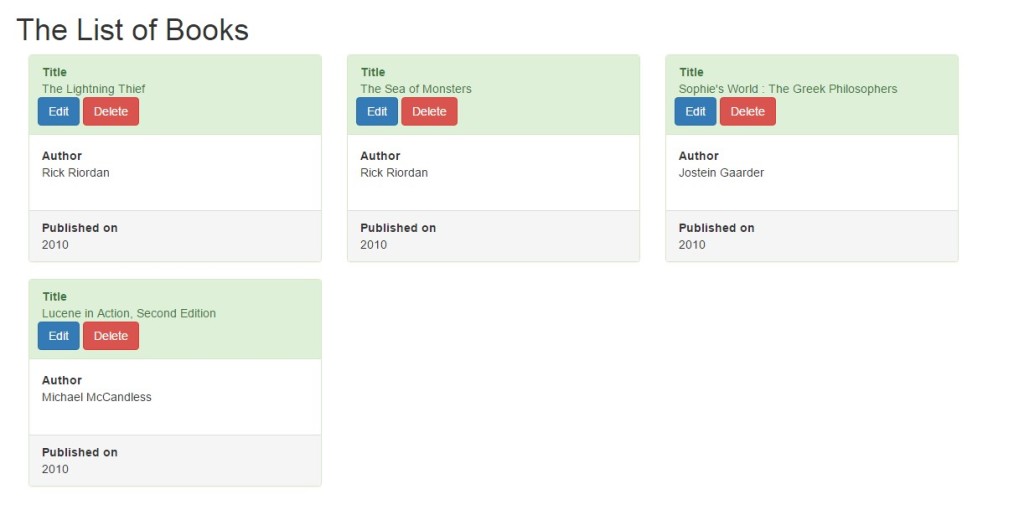
Event Handling in Collections:
It is possible to declare event in order to change the collections.
|
1 2 3 4 5 6 7 8 9 10 11 12 13 14 15 16 17 18 19 20 21 22 23 24 25 26 27 28 29 |
<body> <script type="text/javascript"> …. …. …. …. …. …. …. var addbook = function (model, collection, options) { console.log(""); console.log("add new book:" + model.get("title")); console.log("Collection Count: " + collection.length); }; var updatebook = function (model, changes, c) { console.log(""); console.log("update:" + model.get("title")); console.log(changes); }; …. …. …. …. …. …. …. var books = new Books([book1]); books.on("add", addbook); books.on("change", updatebook); books.add([book2]); book1.set({ title: "The new Moon"}); </script> </body> </html> |
More Practical Interview Questions with Answers below:
How to bind model to view?
Inside the initialize function, we can use listenTo method of View. Another way is to use the binding method on of any model.
|
1 2 3 4 5 6 7 8 9 10 11 12 13 14 15 16 17 18 19 20 21 22 23 24 25 26 27 28 |
"use strict"; var BookView3 = Backbone.View.extend({ renderCount: 0, render: function () { this.renderCount += 1; console.log(this.renderCount); var htmlOutput = this.template(this.model.toJSON()); this.$el.html(htmlOutput); return this; }, initialize: function () { this.template = _.template($("#template-book").html(),{}); this.render(); this.listenTo(this.model, 'change', this.render); // or this.model.on("change", this.render); } }); var book = new Book({ "title": "The Winter Over", "yearPublished": 2010, "author": "Mathew Iden" }); var bookView3 = new BookView3({ model: book, el: $("#container-book") }); |
How to bind Model to event?
- Define the default field of of any Model, here title, description, author, yearPublished and rating are the default fields of Book Model.
123456789101112131415161718192021222324252627282930313233var Book = Backbone.Model.extend({defaults: {title: "",description: "",author: "","yearPublished":"","rating":""},initialize: function () {console.log("Book Model initialize");this.on('change:author', this.notifyAuthor, this);this.on('change', this.notifyGeneral, this);this.on('change:title', this.notifyTitle, this);},notifyAuthor: function() {console.log('author changed');},notifyTitle: function() {console.log('title changed');},notifyGeneral: function() {console.log(general changed');},increamentRating(){console.log('rating ++');this.set({ rating: this.get('rating') + 1 });},decreamentRating(){console.log('rating --');this.set({rating: this.get('rating') - 1 });}}); - Inside the initialize method of the Model, it is possible to map different event for different field of the Model object.
- For example, here if the author field of the model is changed it would trigger ‘change:author’ event that will call notifyAuthor fucntion. Similarly if only ‘change’ event is triggered , corresponding function notifyGeneral will be invoked. For ‘change:title’ event, ‘notifyTitle’ method will be invoked.
On the first line in above example, the title of book object of Model type Book has been updated , therefore a ‘change:title’ event has been triggered. Therefore, corresponding method notifyTitle would be invoked and the console output would be:123456<script type="text/javascript">$(function () {book.set({title: "Uncle Toms Cabin" });book2.set({author: "Maxim Gorky" });})</script>title change
On the second line for the object book2, author has been changed, therefore, a ‘change:author’ event has been triggered and notifyAuthor method would be invoked so the output would be:
author changed
- We can directly invoke method to change any field of the model. In this example, increamentRating function increases the rating field of Book Model by one, where decreamentRating function decrease the rating field of Book Model by one.
increamentRating on book object can be triggered as following:1book.increamentRating();The corresponding output would be:
ratting ++
How to Render View? Explain with Example.
- In the index.html add a placeholder <div> with Id=container-book. This div will be the DOM element for the new view.
1234567891011121314151617181920<!DOCTYPE html><html><head><meta charset="utf-8" /><title></title><link href="bootstrap.min.css" media="all" rel="stylesheet" type="text/css" /><script src="nderscore-min.js"></script><script src="jquery.js"></script><script src="backbone-min.js"></script><script src="backbone.localStorage-min.js"></script><script src="book_model.js"></script><script src="book_view.js"></script></head><body><div id="container-book"></div></body></html> - Create a book View Model in book_view.js file. This view has several options such as className, template, render and initialize. Template is used to define the html template for the new view. Backbone.View has its own render function however that does not do anything. This existing render function is just an abstraction given by backbone.js. Therefore, we have to override ‘render’ function in the new ‘BookView’.
In our render function, we have append the JSON form of the passed model to the view and append the JSON format of the model to the “el” property of the view. In addition, jQuery find the element in the DOM with the id of “container-book” as mentioned earlier and assign the html of “el” to the element. In the render function, a model is passed and the model data is appended to the template function and finally, render function return the html result.
1234567891011var BookView = Backbone.View.extend({template: _.template('<div><dt>Title</dt> <dd><%= title %></dd><dt>Author</dt><dd><%= author %></dd><dt>Description</dt><dd><%= description %></dd><dt>Year Published</dt><dd><%= yearPublished %></dd></div>'),render: function () {this.$el.append(this.template(this.model.toJSON()));$("#container-book").html(this.$el.html());return this;},initialize: function () {console.log("BookView initialize");}}); - The next step is to create a variable of type Book Model. And create a variable bookView of type View called ‘BookView’.
12345678var book = new Book({"title": "The Winter Over","yearPublished": 2010,"author": "Mathew Iden"});var bookView = new BookView({model: book}); - In the index.html create a method which will be called once jQuery finished the document to be ready.
12345<script type="text/javascript">$(function () {bookView.render();})</script>
What is Template? How to use Template in Backbone.js?
Template is one of the core component that I used for the View. Basically, this is the html DOM elements for any View. Backbonejs has dependency on Underscore Js in order to compile template. _template function from underscore is used for compiling template.
|
1 2 3 |
var BookView = Backbone.View.extend({ template: _.template('<div><dt>Title</dt> <dd><%= title %></dd><dt>Author</dt><dd><%= author %></dd><dt>Description</dt><dd><%= description %></dd><dt>Year Published</dt><dd><%= yearPublished %></dd></div>'), … …. … |
Template can be used directly without using any view.
|
1 2 3 4 5 6 7 8 9 10 11 |
<div id="book1-container"></div> <script type="text/javascript"> var book1 = new Book({ "title": "The Winter Over", "yearPublished": 2010, "author": "Mathew Iden" }); var template = "Title: <%=title%>"; var compileTemplate= _.template(template); $("#book1-container").append(compileTemplate(book1.toJSON())); </script> |
- A div need as a placeholder for the template to be viewed in DOM. Lets put an id ‘book1-container’.
- Create the Model book1 which will be passed to the template as data.
- Create a string called template just representing the title from Book Model.
- _template function will take the string template and compile it to make it ready to be rendered.
- Then the placeholder will append the compiled template with the data from passed object (book1).
It is also possible to define the template using text/template script as following:
|
1 2 3 4 5 6 7 8 9 |
<div id="book1-container"></div> <script type="text/template" id="template-book1"> <div class="panel success"> Title: <%=title%> Description: <%=description%> Author: <%=author%> Year Published : <%=yearPublished%> </div> </script> |
Now the id =’template-book1’ will be will be used to obtain Html template using jQuery as following.
|
1 2 3 4 5 6 7 |
<script type="text/javascript"> $(function(){ var template= $("#template-book1").html(); var compileTemplate = _.template(template); $("#book1-container").append(compileTemplate(book1.toJSON())); }) </script> |
It is also possible to user template from another file such as following:
|
1 2 3 4 5 6 7 8 9 10 11 12 13 14 15 16 |
var BookView2 = Backbone.View.extend({ el: "#template",//Container div inside which we would be dynamically loading the templates initialize: function () { console.log('Book View 2 Initialized'); }, render: function () { var that = this; //Fetching the template contents var json = this.model.toJSON(); $.get('templates/book_template.html', function (data) { template = _.template(data,{});//Option to pass any dynamic values to template that.$el.append(template(that.model.toJSON()));//adding the template content to the main template. }, 'html'); } }); |
What is Router? Explain with Example.
In order to navigate between pages and different request, Backbone.js supports Router. Therefore, it is easily navigable.
|
1 2 3 4 |
http://backbone-example.com/#books http://backbone-example.com/#books/new http://backbone-example.com/#books/:id http://backbone-example.com/#search |
Andrew de Andrade, the creator of backboneJS has mentioned that in a application, there will be only one route. It is conventional to have a single route for the entire application.
|
1 2 3 4 5 6 7 8 9 10 11 12 13 14 15 16 17 18 19 20 21 22 23 24 25 26 27 28 29 30 31 32 33 34 35 36 37 38 39 40 41 42 43 44 45 46 47 48 49 50 51 52 |
"use strict"; var BookRouter = Backbone.Router.extend({ routes: { "book/new": "create", "books/index": "index", "book/:id/edit": "edit", "book/:id/delete": "delete" }, $container: $('#primary-content'), initialize: function () { console.log("Router Initialized"); var that = this; var books = new Books(); books.fetch({ url: "components/book/collections/books.json", success: function () { that.collection = books; console.log("Colelction created" + JSON.stringify(that.collection)); that.index(); // start backbone watching url changes Backbone.history.start(); } }); }, create: function () { var view = new BookNewView({ collection: this.collection, model: new Book() }); this.$container.html(view.render().el); }, delete: function (id) { var book = this.collection.get(id); book.destroy(); Backbone.history.navigate("books/index", {trigger: true}); }, edit: function (id) { var view = new BookEditView({model: this.collection.get(id)}); this.$container.html(view.render().el); }, index: function () { var view = new BookIndexView({collection: this.collection}); this.$container.html(view.render()); } }); |
This has all the different route in it. On initialization of the router, the index method is called, therefore, BookIndexView is Initialized and has been rendered. The history is also started monitoring the hashchanged events.
Now if we click the Delete Button on the Index View: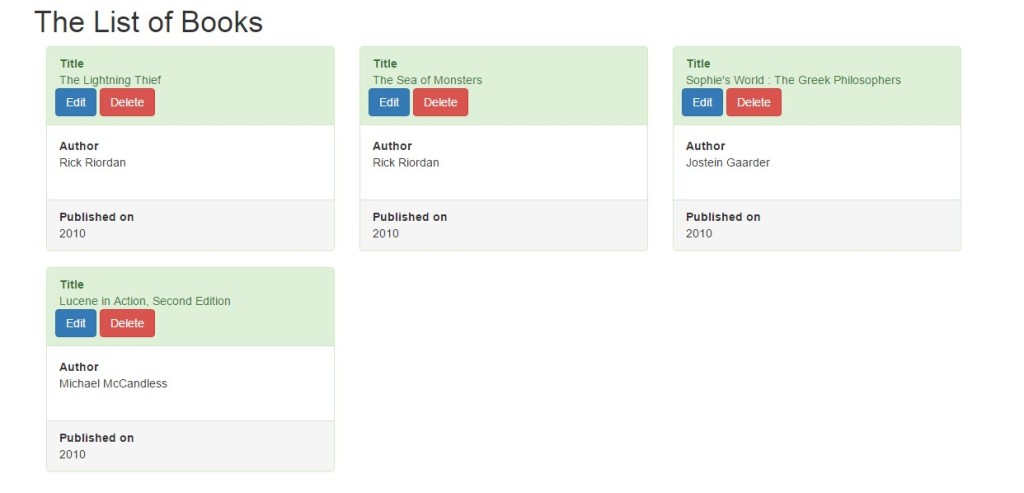
The corresponding Book will be deleted and it will again navigated to the /index URL and BookIndexView will be initialized again,
And the three book can be viewed:
What is Utility? Explain with Example.
Backbone.js Utility class define the following two methods:
Backbone.noConflict
var backbone = Backbone.noConflict();
This method returns the Backbone object back to its original value. Instead of using the global Backbone Object it is possible to use a local instance of Backbone by using this method Backbone.noConflict(). Usually in order to embed Backbone on third-party websites, where we don’t want to mix the Backbone instance with other backbone module it is very useful to use a local reference without messing with existing Backbone.
|
1 2 |
var localBackboneref = Backbone.noConflict(); var model = localBackboneref.Model.extend(...); |
Backbone.$
Most of the time in a website where there can be number of other third party jquery based module are running, different version of jquery can conflict with each other. At that moment among all the multiple copies of Jquery , this method helps to use a perticualr one
|
1 |
Backbone.$ = $; |
Or can use requires to point to a particular version of the Jquery
|
1 |
Backbone.$ = require('jquery'); |
What is Converter? Explain with Example.
Backbonejs support a functionality that called converter. This function helps to copy models attribute to a html attribute and vise versa.
Basically this is used for two way data binding.
There are different way two way binding is possible. For example using Epoxy.js from https://github.com/gmac/backbone.epoxy/blob/master/backbone.epoxy.min.js
- Download and add it to the index.html as following:
1<script src="js/backbone.epoxy.min.js"></script> - Create a Model.
1234var authorModel = new Backbone.Model({firstName: "Maxim",lastName: "Gorky"}); - Create an Proxy View.
123456789var AuthorView = Backbone.Epoxy.View.extend({el: "#app-converter",bindings: {"input.first-name": "value:firstName,events:['keyup']","input.last-name": "value:lastName,events:['keyup']","span.first-name": "text:firstName","span.last-name": "text:lastName"}}); - Load the View.
1var view = new BindingView({model: authorModel}); - The Html Template.
1234567891011<div id="app-converter" class="demo"><label>First:</label><input type="text" class="first-name"><label>Last:</label><input type="text" class="last-name"><b>Full Name:</b><span class="first-name"></span><span class="last-name"></span></div> - Output would be:

- As the Input text change the span first-name and last-name will be changed as we type in the input box
How to Configure Jasmine to execute Unit Testing? Explain with Example.
- Download jasmine from ‘https://github.com/jasmine/jasmine/releases’ and extract inside libs folder.
- Create a spec page to write the unit testing those will be performed on Book Model.
1describe('A Book Model', function() { … } - Inside the function all the necessary unit testing need to be defined as following:
123456789101112131415161718192021222324252627282930313233343536373839404142434445464748495051525354555657585960616263646566676869707172737475767778798081828384858687888990919293949596describe('A Book Model', function() {var MOCK_GET_BOOK = {author: 'Ken Tabor',type:'Short Story',description: 'Heya everyone, we have a crazy big deadline coming up but I know we can do it. Let\'s enjoy a coffee and finish strong!',title: 'Basic Drip'};var MOCK_POST_BOOK = {success: true};it('should be able to create its application test objects', function() {var book = new Book();expect(book).toBeDefined();expect(MOCK_GET_BOOK).toBeDefined();expect(MOCK_POST_Book).toBeDefined();});describe('has property getter functions that', function() {var book = new Book(MOCK_GET_BOOK);it('should return the message', function() {expect(book.getDescription()).toEqual('Heya everyone, we have a crazy big deadline coming up but I know we can do it. Let\'s enjoy a coffee and finish strong!');});it('should return the title', function() {expect(book.getTitle()).toEqual('Basic Drip');});it('should return the type', function() {expect(book.getType()).toEqual('Short Story');});it('should return the author', function() {expect(book.getAuthor()).toEqual('Ken Tabor');});});describe('has property setter functions that', function() {var book = new Book(MOCK_GET_BOOK);it('should set the new description', function() {book.setDescription('Congrats on the speaking engagement');expect(book.get('description')).toEqual('Congrats on the speaking engagement');});it('should set the new title', function() {book.setTitle('Mocha');expect(book.get('title')).toEqual('Mocha');});it('should set the new author', function() {book.setAuthor('Anna Jane');expect(book.get('author')).toEqual('Anna Jane');});});describe('when it fetches', function() {var book;beforeEach(function() {spyOn($, 'ajax').andCallFake(function(options) {options.success(MOCK_GET_BOOK);});book = new Book();book.fetch();});afterEach(function() {book = undefined;});it('should call through to .ajax with proper params', function() {var ajaxCallParams = $.ajax.mostRecentCall.args[0];expect(ajaxCallParams.dataType).toEqual('json');expect(ajaxCallParams.type).toEqual('GET');expect(ajaxCallParams.success).toBeDefined();});it('should be able to parse mocked service response', function() {expect(_.isEmpty(book.attributes)).toEqual(false);expect(book.get('author')).toEqual('Ken Tabor');expect(book.get('description')).toEqual('Heya everyone, we have a crazy big deadline coming up but I know we can do it. Let\'s enjoy a book and finish strong!');expect(book.get('title')).toEqual('Basic Drip');});});}); - Create a specrunner html page.
Now running the specrunner , it will run each of the unit test described in the spec.12345678910111213141516171819202122232425262728293031323334353637383940414243444546474849505152<!DOCTYPE HTML PUBLIC "-//W3C//DTD HTML 4.01 Transitional//EN""http://www.w3.org/TR/html4/loose.dtd"><html><head><title>The Book App Test Runner</title><link rel="stylesheet" type="text/css" href="../libs/jasmine-2.5.2/jasmine.css"><script type="text/javascript" src="../libs/jasmine-2.5.2/jasmine.js"></script><script type="text/javascript" src="../libs/jasmine-2.5.2/jasmine-html.js"></script><!-- app's source code files go here --><script type="text/javascript" src="../libs/jquery/dist/jquery.min.js"></script><script type="text/javascript" src="../libs/underscore/underscore.js"></script><script type="text/javascript" src="../libs/backbonejs/backbone.js"></script><script type="text/javascript" src="../libs/backbonejs/backbone.localStorage.js"></script><script type="text/javascript" src="../libs/requirejs/require.js"></script><script type="text/javascript" src="../components/book/models/book.js"></script><script type="text/javascript" src="../components/book/book_app.js"></script><!-- test spec files go here --><script type="text/javascript" src="specs/models/book_spec.js"></script><script type="text/javascript">(function() {var jasmine = require('../libs/jasmine-2.5.2/jasmine.js');var jasmineEnv = jasmine.getEnv();jasmineEnv.updateInterval = 1000;var htmlReporter = new jasmine.HtmlReporter();jasmineEnv.addReporter(htmlReporter);jasmineEnv.specFilter = function(spec) {return htmlReporter.specFilter(spec);};var currentWindowOnload = window.onload;window.onload = function() {if (currentWindowOnload) {currentWindowOnload();}execJasmine();};function execJasmine() {jasmineEnv.execute();}})();</script></head><body></body></html>
How to Config MongoDB and Setup Connection in Backbone.js Application?
Mongodb can be used with Backbonejs directly by using the third party library backbone-mongodb. Following are the steps:
- Add ‘backbone-mongodb.js’ file on the header of index.html
1<script src="../backbone-mongodb.js"></script> - Enable the app config.
1234567891011121314// Enable cross site scriptingjQuery.support.cors = true;// Disable ajax cachejQuery.ajaxSetup({ cache: false });// Add support of MongoDB Extended JSON_.extend(Backbone.Model.prototype, Backbone.MongoModel.mixin);// Add REST service URLvar appConfig = {baseURL: 'https://api.mongolab.com/api/books/databases/collections/',addURL: '?apiKey=yGobEjzhT76Pjo9RaOLGfA89xCJXegpl'} - Create Model Extending Backbone.MongoModel instead of Backbone.Model. For example,
Backbone-mongodb overrides Backbone.parse() and Backbone.sync() methods to convert MongoDB Extended JSON to normal JSON.123var Book = Backbone.MongoModel.extend({urlRoot: '/books'}); - Create a collection.
Now use the Backbone Router to access different CRUD operation.123456var Books = Backbone.Collection.extend({model: Book,url: function() {return appConfig.baseURL + 'books' + appConfig.addURL;}});
How to prevent Memory Leaks in Backbone.js Application?
Backbone.js is not a complete framework, it needs other framework to reply on. Therefore, most often developers use Marionette in order to perform memory management. As stated on the Chrome Developer Tools - JavaScript Profiling site,
“A memory leak is a gradual loss of available computer memory. It occurs when a program repeatedly fails to return memory it has obtained for temporary use. JavaScript web apps can often suffer from similar memory related issues that native applications do, such as leaks and bloat but they also have to deal with garbage collection pauses.”
In backbone.js application , memory leak is often occurred durig pushing nested view to a parent view. Therefore it is necessary to keep track all the nested view and add them or remove them correctly.
|
1 2 3 4 5 6 7 8 9 10 11 12 13 14 15 16 17 18 19 20 21 22 23 24 25 26 27 28 29 30 31 32 |
var BookParentView = Backbone.View.extend({ initialize: function() { this.bookChildViews = []; }, tagName: 'div', id: book, render: function() { this.collection.each(function(model) { var view = new BookView({ model: model }); view.render(); this.childViews.push(view); this.$el.append(view.el); }, this); } }); var booksView = new BooksView({ collection: books }); booksView.render(); // add the BooksView collection-view to the DOM $('#booklist-container').append(booksView.el); // remove each BookView instance booksView.bookChildViews.forEach(function(bookView) { bookView.remove(); }); |
Back to top
That is all we have about Backbone.js Interview Questions and Answers. Next we will come up with more related Interview Questions and Answers. You can follow the below given other web development interview questions and answers to improve your technical skills.
More Related and MEAN Stack Tutorial
Following MEAN Stack & Related Tutorials will be helpful to practically grasp the technology.